Liason: MVVM on Android Before Architecture Components Existed
In 2014, Android had no ViewModel, no LiveData, no Room, no Repository pattern. If you wanted reactive UI updates driven by a structured data layer, you had to build it yourself from the platform primitives: ContentProvider, CursorLoader, and SQLiteDatabase.
That’s what Liason is. A three-module MVVM framework that enforces separation of concerns between Models (SQLite tables), ViewModels (SQLite views), and Views (Activities/Fragments with data binding), using only APIs that shipped with the platform. It powered production apps years before Google shipped Architecture Components in 2017.
The Problem
Android apps in 2013-2014 were a mess of tangled concerns. Activities fetched data from APIs, parsed JSON, wrote to databases, and updated UI, all in the same class. Configuration changes like screen rotation destroyed the Activity and all its state. Background threads held references to dead Activities, causing memory leaks and crashes.
The community knew MVVM and MVP patterns could fix this, but Android had no framework support. You either rolled your own architecture or accepted spaghetti.
Liason’s insight was that Android already had a reactive data pipeline in ContentProvider + CursorLoader. It just needed structure on top of it.
Architecture
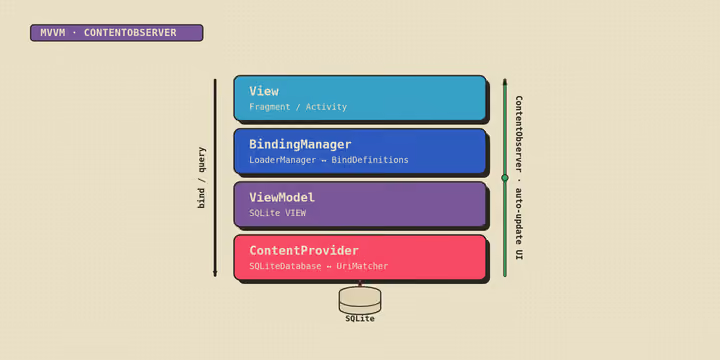
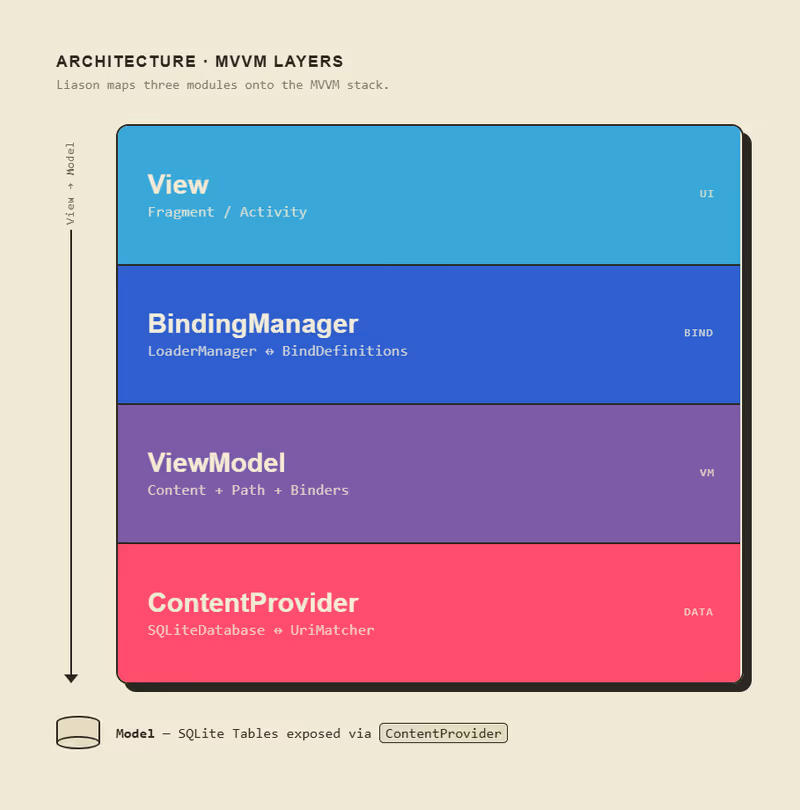
Liason has three modules that mirror the MVVM layers:
Model: SQLite Tables via Annotations
A Model is a SQLite table defined declaratively with annotations. No raw SQL, no manual CREATE TABLE strings:
public class UserModel extends Model {
    private static final String TABLE_NAME = "Users";

    @ColumnDefinitions
    public static class Columns {
        @ColumnDefinition @PrimaryKey
        public static final ModelColumn ID =
            new ModelColumn(TABLE_NAME, "_id", Column.Type.integer);

        @ColumnDefinition @Unique
        public static final ModelColumn EMAIL =
            new ModelColumn(TABLE_NAME, "email", Column.Type.text);

        @ColumnDefinition
        public static final ModelColumn NAME =
            new ModelColumn(TABLE_NAME, "name", Column.Type.text);
    }
}
At construction time, Model scans its inner classes via reflection, finds every @ColumnDefinition, @PrimaryKey, and @Unique field, and generates the SQL automatically:
CREATE TABLE IF NOT EXISTS Users (
    _id INTEGER, email TEXT, name TEXT,
    UNIQUE ( email ) ON CONFLICT REPLACE,
    PRIMARY KEY ( _id )
);
Each Model also declares @PathDefinition fields that register URI patterns with the ContentProvider. This is how the framework knows which table to route a content:// URI to.
ViewModel: SQLite Views for the UI
This is the key architectural decision. A ViewModel in Liason is literally a SQLite VIEW, a read-only projection that combines data from one or more Model tables into exactly the shape the UI needs:
public class ProductsViewModel extends ViewModel {
    @ColumnDefinitions
    public static class Columns {
        @ColumnDefinition
        public static final ViewModelColumn NAME =
            new ViewModelColumn(VIEW_NAME, ProductModel.Columns.NAME);

        @ColumnDefinition
        public static final ViewModelColumn PRICE =
            new ViewModelColumn(VIEW_NAME, ProductModel.Columns.PRICE);
    }

    @Override
    protected String getSelection(Context context) {
        return "Products";  // FROM clause
    }
}
The generated SQL:
CREATE VIEW IF NOT EXISTS ProductsView AS
    SELECT Products.name AS name, Products.price AS price
    FROM Products;
Why SQLite views? Because Android’s ContentObserver system already watches for changes to content URIs. When a Model table gets updated (new data from an API, user input, whatever), any CursorLoader watching a ViewModel view that references that table gets notified automatically. The UI re-queries and updates. No manual notification, no event bus, no callback hell.
This is exactly what LiveData + Room would do three years later, but using the database engine itself as the reactive layer.
BindingManager: The Glue
The BindingManager connects ViewModels to UI components. It creates a CursorLoader for each BindDefinition, registers ContentObservers on the corresponding URIs, and routes loaded cursors back to the UI:
// In your Activity
ActivityBindingManager manager = new ActivityBindingManager(this);
manager.addBindDefinition(new ProductsAdapterBinding(this));

@Override
protected void onStart() {
    super.onStart();
    manager.onStart(this);  // starts all loaders
}

@Override
protected void onStop() {
    manager.onStop(this);   // unregisters observers
    super.onStop();
}
Each BindDefinition defines what URI to watch, what projection to use, and how to bind the cursor data to views. When the loader delivers data, onBind(Context, Cursor) is called and the UI updates.
Task: Background Work with Observable State
The task module handles background operations like API calls and data processing with built-in state management. Each Task writes its lifecycle state (RUNNING, SUCCESS, FAIL) to a TaskStateTable via the ContentProvider. The UI observes this table through a ViewModel, so progress indicators and error states are reactive too:
public class FetchProductsTask extends Task {
    @Override
    protected void onExecuteTask(Context context) throws Exception {
        String json = httpClient.get("https://api.example.com/products");
        ContentValues[] values = parseProducts(json);
        context.getContentResolver().bulkInsert(productsUri, values);
    }
}
Tasks auto-skip if the data isn’t stale (configurable via getUpdateTime()), preventing redundant network calls on configuration changes.
What Made This Different
In 2014, the Android community was debating MVP vs. MVC. Liason went with MVVM and made a bet on ContentProviders as the reactive backbone. That bet turned out to be architecturally aligned with where Google eventually went.
The key ideas that Architecture Components later adopted:
- Lifecycle-aware data observation: Liason’s
BindingManager.onStart()/onStop()mirrorsLiveData’s lifecycle awareness - Database-backed ViewModels: Room’s
@DatabaseViewis the same concept as Liason’sViewModel(SQLite VIEW) - Structured background work:
Task’s state table anticipates WorkManager’s observable work states - Annotation-driven schema: Room’s
@Entity/@ColumnInfomirrors Liason’s@ColumnDefinition/@ModelColumn
The difference is that Liason did it with zero dependencies beyond the Android SDK and Gson for JSON serialization.
The Provider Pattern
One design decision worth highlighting: Liason’s Provider class is a single ContentProvider that routes all URIs to the correct Content (Model or ViewModel) using a UriMatcher. You declare one provider in your manifest, register all your models and viewmodels with a DatabaseHelper, and every CRUD operation flows through the same pipeline.
This means your entire data layer (tables, views, URI routing, versioning) is defined in one place. Adding a new model is: create the class, add it to the DatabaseHelper’s content list. The Provider handles everything else.
Source Code
The full source is on GitHub:
Licensed under Apache 2.0.
Found this useful?
Tinker North runs on donations, with no ads and no paywalls. If this helped, consider chipping in.