
Parchment: The Android AdapterView Library That Still Does What RecyclerView Can't
In 2013, if you wanted a horizontal scrolling list on Android, your options were terrible. Gallery was the only stock widget that scrolled horizontally, and it didn’t recycle views. Scroll through 200 items and you’d have 200 views in memory. ListView only scrolled vertically. GridView only scrolled vertically. And if you were building for Google TV or tablets, where horizontal content rows were the primary navigation pattern, you were stuck.
I built Parchment to fix this. It’s a set of custom AdapterView components (ListView, GridView, ViewPager, and GridPatternView) that handle both horizontal and vertical scrolling with built-in view recycling, snap positioning, circular scrolling, and declarative grid patterns. It powered production apps on Google TV, Android tablets, and phones.
RecyclerView shipped with the support library in late 2014, and it solved the horizontal scrolling problem. But Parchment still has features that RecyclerView doesn’t offer natively, even today.
The Problem with Early Android UI
Before RecyclerView, Android’s scrolling widgets had hard limitations:
| Widget | Horizontal | Recycling | Snap | Circular |
|---|---|---|---|---|
Gallery | Yes | — | Center only | — |
ListView | — | Yes | — | — |
GridView | — | Yes | — | — |
ViewPager | Yes | Yes | Page only | — |
| Parchment | Yes | Yes | 4 modes | Yes |
Gallery was the go-to for horizontal scrolling, especially on Google TV where content carousels were the primary UI pattern. But it held every child view in memory. On a TV app showing movie posters, that meant loading hundreds of ImageViews simultaneously. It was a memory disaster.
ListView had excellent view recycling through the Adapter pattern, but it was locked to vertical scrolling. If you wanted horizontal, you had to write your own ViewGroup from scratch.
What Parchment Does
Parchment extends AdapterView directly and implements its own layout engine and view recycler. Every component supports both horizontal and vertical orientation through a single XML attribute.
Horizontal & Vertical ListView
<mobi.parchment.widget.adapterview.listview.ListView
    xmlns:parchment="http://schemas.android.com/apk/res-auto"
    parchment:orientation="horizontal"
    parchment:cellSpacing="20dp"
    parchment:snapPosition="start"
    parchment:snapToPosition="true"
    android:layout_width="match_parent"
    android:layout_height="match_parent" />
One attribute flips the scroll direction. The same adapter, the same view recycling, the same snap behavior, just horizontal instead of vertical. No separate LayoutManager, no SnapHelper, no configuration ceremony.
Built-in Snap Positioning
Parchment has four snap modes built into the layout engine:
center: snaps the nearest item to the center of the viewportstart: snaps to the leading edgeend: snaps to the trailing edgeonScreen: free-scrolling, items stop wherever they land
With RecyclerView, snap positioning requires adding a LinearSnapHelper or PagerSnapHelper, each with their own quirks and limitations. With Parchment, it’s one XML attribute.
Circular (Infinite) Scrolling
<mobi.parchment.widget.adapterview.listview.ListView
    parchment:isCircularScroll="true"
    parchment:orientation="horizontal"
    parchment:snapPosition="center"
    parchment:snapToPosition="true"
    android:layout_width="match_parent"
    android:layout_height="match_parent" />
One boolean. The list wraps around seamlessly. This was critical for Google TV content carousels where users D-pad through movie rows. Hitting the end of the list should wrap back to the beginning, not dead-stop.
RecyclerView has no native circular scrolling. The common workaround is returning Integer.MAX_VALUE from getItemCount() and using modulo arithmetic in onBindViewHolder(). It works, but it’s a hack: it breaks scrollToPosition(), confuses accessibility services, and creates edge cases with item animations.
ViewPager Mode
<mobi.parchment.widget.adapterview.listview.ListView
    parchment:isViewPager="true"
    parchment:isCircularScroll="true"
    parchment:snapPosition="start"
    parchment:snapToPosition="true"
    parchment:orientation="vertical"
    android:layout_width="match_parent"
    android:layout_height="match_parent" />
Parchment’s ListView doubles as a ViewPager with a single attribute. Same adapter, same recycling. You can even combine it with circular scrolling for an infinite-scroll pager, something that requires ViewPager2 plus the Integer.MAX_VALUE hack on RecyclerView.
GridPatternView
This is the feature RecyclerView genuinely cannot replicate without significant custom LayoutManager work.
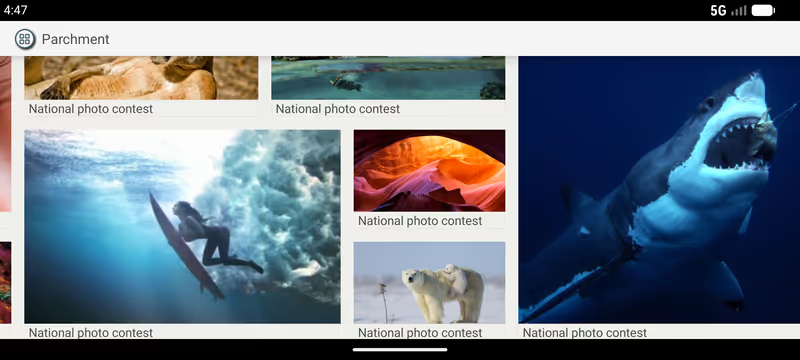
GridPatternView lets you define arbitrary grid cell patterns. Instead of a uniform grid, you define a pattern of cells with different row/column spans, and the pattern repeats across your data:
<mobi.parchment.widget.adapterview.gridpatternview.GridPatternView
    parchment:cellSpacing="12dp"
    parchment:orientation="horizontal"
    parchment:snapPosition="onScreen"
    parchment:ratio="1.618"
    android:layout_width="match_parent"
    android:layout_height="match_parent" />
The ratio attribute controls the aspect ratio of grid cells. The pattern itself is defined programmatically through GridPatternGroupDefinition, which maps adapter positions to grid coordinates with arbitrary widths and heights. This creates layouts like “one large hero tile next to two small tiles stacked vertically”, repeating across the entire dataset with full view recycling.

How the Architecture Works
Parchment doesn’t use RecyclerView’s ViewHolder pattern. It extends AdapterView and works directly with the classic Adapter interface, the same one ListView and GridView use. The architecture has three main layers:
AdapterViewManager: The View Recycler
The AdapterViewManager maintains a pool of recycled views organized by view type, using a Map<View, Integer> to track which type each view belongs to:
public void recycle(final View removedView) {
    final Integer type = mViewTypeMap.remove(removedView);
    if (type == null) return;
    final Queue<View> views = mViews.get(type);
    views.add(removedView);
}

public View getView(final ViewGroup viewGroup, final int position,
                    final int widthMeasureSpec, final int heightMeasureSpec) {
    final int type = mAdapter.getItemViewType(position);
    final Queue<View> views = mViews.get(type);
    final View convertView = views.poll();
    final View view = mAdapter.getView(position, convertView, viewGroup);
    if (view != convertView || view.isLayoutRequested()) {
        measureView(viewGroup, view, widthMeasureSpec, heightMeasureSpec);
    }
    return view;
}
This is leaner than RecyclerView’s ViewHolder pattern. There’s no wrapper object around each view, no onCreateViewHolder/onBindViewHolder split. The adapter’s getView() handles both creation and binding, and the recycler only measures views that actually need it.
LayoutManager: The Layout Engine
The LayoutManager handles positioning, scrolling, snapping, and circular wrapping. Circular scrolling works by wrapping cell positions when they exceed the adapter bounds. When the user scrolls past the last item, the position wraps to 0. The layout engine handles this transparently without adapter-side hacks.
ScrollDirectionManager: Orientation Abstraction
The ScrollDirectionManager abstracts horizontal vs. vertical layout behind a single interface. Methods like getViewStart(), getViewEnd(), and getViewSize() return left/right or top/bottom depending on orientation. The layout engine is written once and works for both directions.
Parchment vs. RecyclerView
RecyclerView is the standard. But it’s a toolkit where you assemble behavior from separate components. Parchment is opinionated, the behavior is built in.
| Feature | Parchment | RecyclerView |
|---|---|---|
| Horizontal + vertical | Yes | Yes |
| Circular scrolling | Yes | — |
| Snap positioning | Built-in (4 modes) | Add-on (SnapHelper) |
| ViewPager mode | Built-in | Separate widget |
| Grid patterns | Built-in | Custom LayoutManager |
| D-pad / TV focus | Built-in | Manual setup |
| View recycling | Yes | Yes |
| DiffUtil | — | Yes |
| Item animations | — | Yes |
| Prefetching | — | Yes |
| Drag and drop | — | Yes |
| Nested scrolling | — | Yes |
Where Parchment has the edge
Circular scrolling is a single XML attribute. RecyclerView’s workaround (returning Integer.MAX_VALUE from getItemCount() and using modulo in onBindViewHolder()) breaks scrollToPosition(), confuses accessibility services, and creates edge cases with item animations. Parchment wraps positions natively in the layout engine.
Snap positioning comes in four modes with zero code. RecyclerView requires attaching a LinearSnapHelper or PagerSnapHelper, each with their own quirks and limitations.
ViewPager behavior is just isViewPager="true" on a ListView. Same adapter, same recycling, combinable with circular scroll. RecyclerView requires a completely separate ViewPager2 widget with its own adapter type.
GridPatternView defines repeating patterns of mixed-span cells declaratively. Think one large hero tile next to two stacked small tiles, repeating across the dataset. Replicating this in RecyclerView means writing a custom LayoutManager from scratch, typically hundreds of lines.
D-pad focus management is inherited from AdapterView, which has built-in focus handling for remote and D-pad navigation on TV. RecyclerView requires manual FocusFinder configuration.
Where RecyclerView has the edge
DiffUtil calculates minimal change sets and only rebinds affected items. Parchment’s notifyDataSetChanged() invalidates everything, so for frequently-changing data like chat or social feeds, RecyclerView does dramatically less work.
Item animations via ItemAnimator handle add, remove, move, and change transitions per item. Parchment has no animation system, layout changes are instant.
Prefetching via GapWorker creates and binds upcoming views during frame idle time, reducing jank during fast flings. Parchment only creates views as they scroll into the viewport.
Drag and drop via ItemTouchHelper and nested scrolling via NestedScrollingChild are built into the RecyclerView ecosystem with no equivalent in Parchment.
Configuration: circular carousel
The same feature, a horizontal, center-snapping, infinite carousel, in both libraries.
Parchment (XML only, zero code):
<mobi.parchment.widget.adapterview.listview.ListView
    parchment:orientation="horizontal"
    parchment:snapPosition="center"
    parchment:snapToPosition="true"
    parchment:isCircularScroll="true"
    android:layout_width="match_parent"
    android:layout_height="match_parent" />
RecyclerView (XML + LayoutManager + SnapHelper + adapter hack):
recyclerView.layoutManager =
    LinearLayoutManager(context, LinearLayoutManager.HORIZONTAL, false)
recyclerView.adapter = object : RecyclerView.Adapter<VH>() {
    override fun getItemCount() = Int.MAX_VALUE
    override fun onBindViewHolder(holder: VH, pos: Int) {
        val real = pos % actualItemCount
        // bind data[real]
    }
}
LinearSnapHelper().attachToRecyclerView(recyclerView)
Three separate concerns stitched together, and the Integer.MAX_VALUE trick is fragile. Parchment handles it in the layout engine with zero adapter-side logic.
The bottom line
Parchment recycles raw View objects with no ViewHolder wrapper overhead, and skips re-measurement on recycled views when the layout hasn’t been invalidated. For static or slowly-changing content like TV carousels, image galleries, and product grids, that leaner recycling combined with built-in features makes it more efficient end-to-end. For dynamic feeds with frequent inserts, removals, and animations, RecyclerView’s diffing and animation systems are substantially better.
Using Parchment
Setting up Parchment follows the classic AdapterView pattern:
ListView listView = findViewById(R.id.horizontal_list_view);
listView.setAdapter(new MyAdapter());
The adapter is a standard BaseAdapter:
public class MyAdapter extends BaseAdapter {
    @Override
    public View getView(int position, View convertView, ViewGroup parent) {
        if (convertView == null) {
            convertView = LayoutInflater.from(parent.getContext())
                .inflate(R.layout.list_item, parent, false);
        }
        // bind data to convertView
        return convertView;
    }
    // ... getCount(), getItem(), getItemId()
}
No ViewHolder, no onCreateViewHolder, no onBindViewHolder. If you’ve written any Android code before RecyclerView, this pattern is immediately familiar.
Google TV and the 10-Foot Experience
The original motivation for Parchment was Google TV. In 2012-2013, Android on TV meant D-pad navigation, horizontal content rows, and large screens viewed from across the room. The platform’s stock widgets weren’t designed for this:
Gallerywould load all movie posters at once. On a TV app with hundreds of titles, that was an instant OOM crashListViewcouldn’t scroll horizontally, so you couldn’t build content carousels- The standard
ViewPagerdidn’t support circular scrolling or work with regular adapters
Parchment solved all three. A horizontal ListView with circular scrolling and center-snap gave you a Netflix-style content carousel with full view recycling. GridPatternView gave you magazine-style hero layouts for featured content. And everything worked with D-pad navigation out of the box, because AdapterView has built-in focus management.
Source Code
The full source is on GitHub, modernized to Gradle 8.13 / AGP 8.13.2 with a version catalog, CI, and JitPack publishing:
// Add via JitPack
dependencies {
    implementation("com.github.EmirWeb:parchment:2.0.0")
}
Licensed under Apache 2.0. Contributions welcome.
Found this useful?
Tinker North runs on donations, with no ads and no paywalls. If this helped, consider chipping in.