Reviewing My Own Web 2.0 Code: Star Fighter in JavaScript (2010)
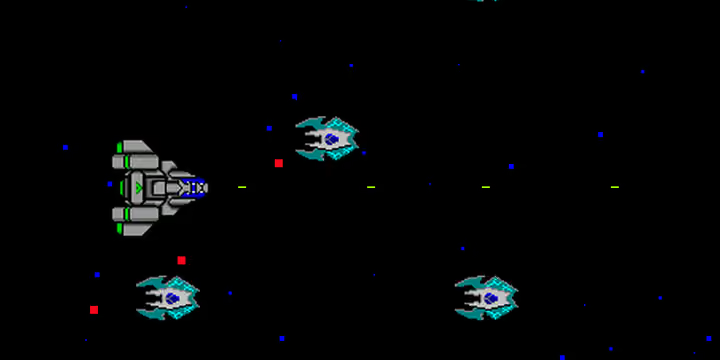
Around 2010 I decided to rebuild my high school QBasic game in JavaScript. The goal wasn’t to make a great game. It was to learn “Web 2.0.” jQuery was king, <canvas> was brand new and poorly supported, and the idea of using the DOM itself as a game engine felt like a reasonable experiment. Looking at this code today, it’s a solid time capsule of how we thought about the browser before modern web development existed.
You can play it right now. But let’s talk about what’s actually happening under the hood.
The Core Idea: The DOM Is the Game Engine
The fundamental architectural decision, and the most interesting one, is that there is no canvas. Every game entity is a <div> or <img> element, positioned absolutely with CSS, moved by updating .css('left', x) and .css('top', y) every frame via jQuery. Stars, bullets, enemies, explosions, the player ship: all DOM elements.
var fighter = $('<div class="StarFighter"></div>');
var image = $(
  '<img class="StarFighter" width="64px" height="64px" src="StarFighter.png" />',
);
// ...
fighter.css("top", y);
fighter.css("left", x);
This is the DOM-as-renderer pattern. The browser’s layout engine becomes your graphics pipeline. It works, surprisingly well for 2010, but it means every frame triggers style recalculations and potentially reflows across hundreds of elements.
Engine Architecture
The Game Loop
Canvas.js is the central controller, despite its name. It doesn’t wrap a <canvas> element. It manages a container <div>, maintains an entity registry, and runs the game loop:
var animate = function () {
  for (var index in objects) {
    if (objects[index].isVisible()) objects[index].animate();
    else delete objects[index];
  }
  collisionDetector.handleCollisions(objects);
  setTimeout(animate, Math.max(0, 1000 / desiredFps - elapsedTime));
};
Every entity implements a common interface: animate(), isVisible(), getDomObject(), getType(), getDimensions(), and destroy(). This is a polymorphic entity-component pattern (before I knew what that term meant), implemented through JavaScript’s duck typing. If it has animate() and isVisible(), it’s a game entity.
The loop targets 70 FPS and uses setTimeout with elapsed-time compensation. Not requestAnimationFrame. That API existed but wasn’t widely supported or well-understood in 2010.
Entity System
Each entity class follows the same pattern:
- Constructor creates DOM elements with jQuery
- State is tracked in closure variables (position, speed, health, visibility)
animate()updates position and calls.css()to move the elementdestroy()calls.remove()on the jQuery object
The StarFighter manages its own bullet pool, tracks a fireType state (0-5) for weapon upgrades, and handles input through keydown/keyup listeners bound to document. The fire system uses setTimeout for rate limiting: a firing flag is set to true on fire, then reset after fireDelay milliseconds.
Collision Detection: Spatial Grid
The most architecturally ambitious piece is CollisionDetector.js. It implements a spatial grid: the screen is divided into cells (gridFactor = 20 pixels), and entities are binned into grid cells based on their bounding shapes. Collision checks only happen between entities that share a grid cell.
for (x = Math.max(0, left); x <= Math.min(width, right); x++)
  for (y = Math.max(0, top); y <= Math.min(height, bottom); y++)
    setGrid(x, y, object, objects[object]);
It even supports multiple shape primitives (Rectangle, Triangle, and Circle), each with their own intersection logic. The StarFighter’s hitbox is actually a rectangle plus a triangle (the nose cone), not just a bounding box. For a learning project in 2010, this is surprisingly good collision detection.
Wave Spawning
The Scroller class acts as the level director. It tracks a virtual x-position that advances each frame, and when it passes an enemy’s spawn coordinate in the enemyList data array, it creates a new Enemy and appends it to the canvas. This mirrors the QBasic version’s data-driven level design: enemy waves are defined in data, not in code.
What I Got Right
The entity interface is clean. Every game object conforms to the same contract. Adding a new entity type (enemy variant, power-up type) means writing one class that implements five methods. The Canvas controller doesn’t need to know what it’s managing.
Collision detection is properly abstracted. Separating collision logic into its own class with spatial partitioning shows genuine architectural thinking. The grid approach is the right algorithm for this problem, reducing O(n²) pairwise checks to roughly O(n).
Data-driven enemy waves. The enemyList.js array defines when and where enemies spawn. Tweaking difficulty means editing a data file, not rewriting game logic.
The closure pattern for encapsulation. Using function-scope variables as private state was the standard pre-ES6 approach, and it’s used consistently throughout. Each entity’s internal state is actually private.
What I’d Fix Today
The DOM Is Not a Game Engine
The biggest issue is the fundamental premise. Moving hundreds of absolutely-positioned <div> elements 70 times per second forces the browser to recalculate styles, update the render tree, and potentially reflow the layout on every frame. Modern browsers optimize this better than 2010 browsers did, but it’s still vastly more expensive than drawing to a <canvas>. A single ctx.drawImage() call replaces the entire jQuery element lifecycle (create → append → css → remove).
Global State and Tight Coupling
canvas and collisionDetector are global variables. Every entity reaches into canvas to get dimensions, find other entities, or append new objects. The Enemy class calls canvas.getObject('StarFighter') to aim its bullets, so it’s directly coupled to the player entity through a string-based lookup on a global. Dependency injection (passing the canvas to constructors) would have made testing and reasoning about the code much easier.
Memory Management via Object Deletion
Dead entities are cleaned up with delete objects[index] inside the animation loop. The entity registry is a plain object with numeric string keys, not an array, so “deleting” leaves gaps in the key space, and the size counter only ever increments. Over a long game session, the object pool grows unbounded in key space even as the actual entity count stays bounded. An array with splice, or a proper object pool, would be better.
jQuery for Everything
jQuery was the right tool for web applications in 2010, but for a game engine, it adds overhead on every single operation. $('<div class="Bullet"></div>') creates a jQuery wrapper, parses HTML, and returns a jQuery object, all for a 5x1 pixel bullet that exists for half a second. Raw document.createElement('div') would have been faster and more appropriate.
No requestAnimationFrame
The loop uses setTimeout(animate, delayTime) with manual elapsed-time math. requestAnimationFrame synchronizes with the display’s refresh rate, provides a high-resolution timestamp, and automatically pauses when the tab is inactive. It was available in 2010 (Chrome 10, Firefox 4), but I didn’t know about it.
The date.getTime() Bug
var date = new Date();
// ...
var startTime = date.getTime();
// ... animation work ...
var endTime = date.getTime();
date is created once in the constructor and never updated. getTime() on the same Date object returns the same value every time, so elapsedTime is always 0, and delayTime is always 1000/70 ≈ 14ms. The frame-time compensation doesn’t actually work. It should be new Date().getTime() (or Date.now()) on each call.
What This Project Really Was
This wasn’t a game development project. It was a web development learning project that happened to produce a game. I was learning jQuery, CSS positioning, closures, constructor functions, and the DOM API. The game was just the most fun vehicle for that learning.
The architectural decisions make a lot more sense through that lens. Using DOM elements instead of canvas? That’s because I was learning how the DOM works. jQuery everywhere? I was learning jQuery. Constructor functions with prototype-less methods? I was learning JavaScript’s object model. The code is exactly what it should be: a snapshot of someone figuring out Web 2.0 by building something ambitious with it.
Play It
WASD to move, Enter to fire. It runs in any modern browser. The DOM-as-engine approach, for all its inefficiencies, is surprisingly portable.
Source Code
The full source is on GitHub:
TinkerNorth/javascript-star-fighter
Licensed under LGPL-3.0. Contributions welcome.
Found this useful?
Tinker North runs on donations, with no ads and no paywalls. If this helped, consider chipping in.